
Ramadan Buffet Booking System Malaysia
Ramadan Buffet Booking & QR Check-in System
Manage your Ramadan buffet from the first booking until your guest checks in.
Accept bookings, collect payments, issue QR tickets and track attendance from one dashboard.
RM0 · 30 Successful Bookings · No card required
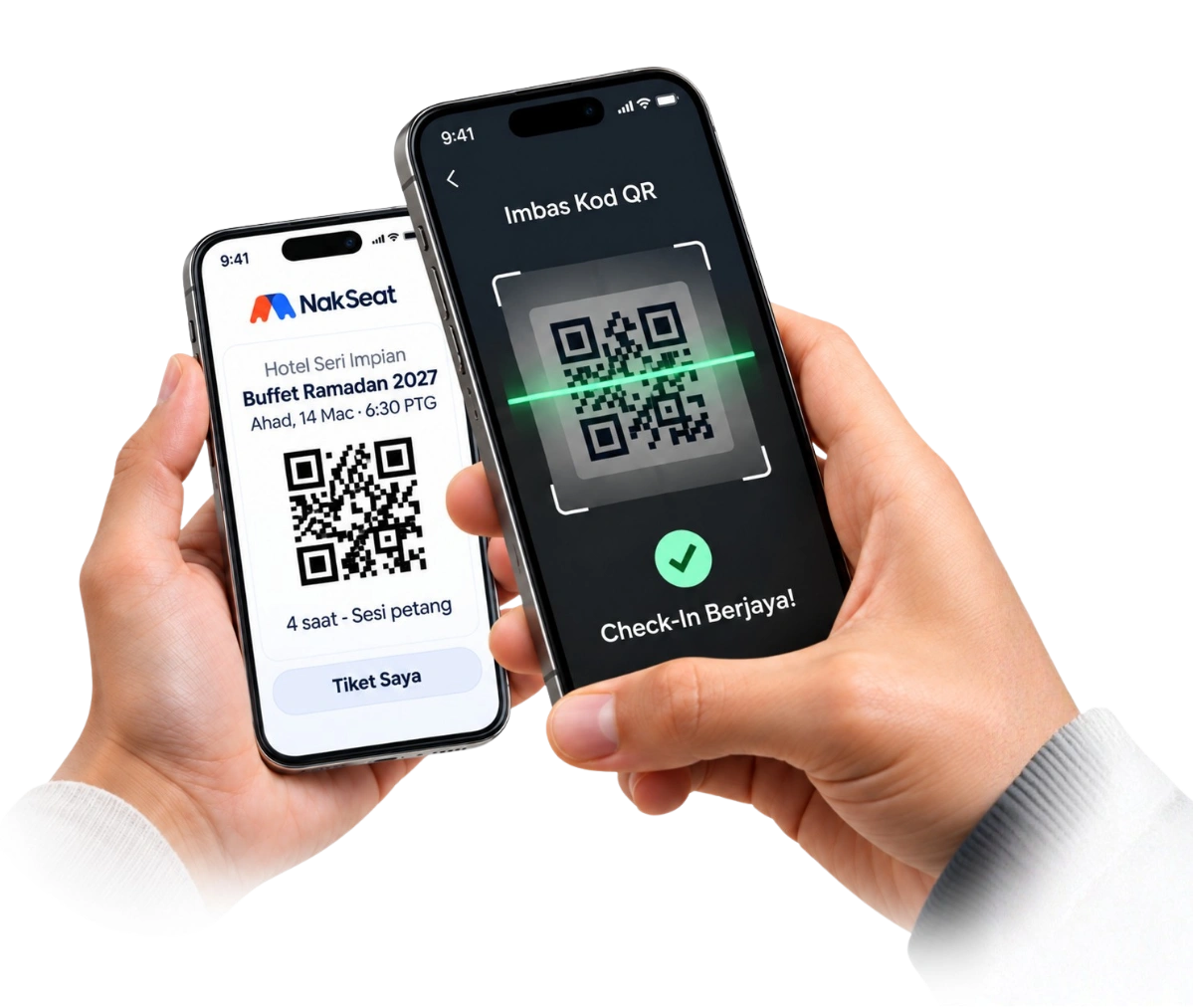
The guest journey
- 01BookPick a date and seats
- 02PayFPX online banking
- 03Get QR ticketSent by email
- 04Check inStaff scan at the door
Common Challenges
Managing Ramadan Buffet Bookings Shouldn’t Feel Like Managing a Spreadsheet
- Bookings coming from multiple WhatsApp conversations
- Staff manually updating Excel
- Hard to know remaining capacity for each session
- Duplicate or missing guest information
- Manual payment checking
- Slow check-in queues
- Difficult to track who has actually arrived
- Sales coming from different agents or staff
- Hard to see real booking and revenue numbers quickly
How It Works
From Booking to Check-in — One Flow
- 01
Promote
Share your buffet booking page through Facebook, Instagram, WhatsApp or your website.
- 02
Book
Customers choose the available event/session and submit their booking.
- 03
Pay
Customers complete payment through the configured payment flow.
- 04
Ticket
A QR ticket is issued for the booking.
- 05
Check-in
Staff scan the QR when guests arrive.
- 06
Track
Bookings, tickets, revenue, attendance and sales attribution stay recorded inside NakSeat.
Start Managing Your Buffet with NakSeat
Who It Is For
Built for Teams Running Paid Events and Buffet Sessions
- Hotels
- Restaurants
- Caterers
- Event Venues
- Ramadan Buffet Operators
- Sales Teams Selling Buffet Vouchers
The same event booking system also runs seminars, workshops, corporate events and ticketed dining all year round.
Features
What your team gets on the night — and every day before it
Online Booking Page
One link guests open on their phone to see dates, sessions and prices.
Session / Event Management
Every night and sitting under one event, each with its own seat quota.
Online Payment Flow
Guests pay through your own Billplz account; unpaid holds expire on their own.
Automatic QR Ticket
Issued as soon as payment is confirmed, and reopenable from My Tickets.
Multi-device QR Scanner
Several staff scan at once on their own phones at different doors.
Partial Guest Arrival
Admit part of a group now and the rest later without losing count.
Manual Booking / Sales Entry
Record walk-ins or bank transfers, released after owner approval.
Sales Staff Attribution
Each salesperson gets a tracked link, so revenue is credited correctly.
Booking Source Tracking
See which campaign or channel brought each booking.
Customer List
Every guest's details in one place for confirmation and follow-up.
Paid Revenue Tracking
Know what has actually been paid, per event and session.
Attendance Records
Tickets sold versus guests who actually arrived, with an adjustment history.
Booking CSV Export
Export bookings and attendance for finance and catering counts.
Real-time Owner Dashboard
Bookings, revenue and check-ins update as they happen.
Every feature above is included on every plan. Browse all NakSeat features.
Excel vs NakSeat
Excel Works — Until the Operation Gets Busy
Excel / Manual Workflow
- Customer contacts staff
- Staff checks availability
- Staff records name
- Staff checks payment
- Staff sends confirmation
- Staff searches guest name during arrival
- Attendance updated manually
NakSeat Workflow
- Customer books
- Payment recorded
- QR issued
- QR scanned at entrance
- Attendance recorded automatically
You don’t need to stop using spreadsheets for everything. NakSeat simply handles the booking-to-attendance workflow that becomes repetitive when booking volume increases. Read the full comparison.
Free Tools
Free Ramadan Buffet Planning Tools
No login needed. Plan first — decide on a booking system later.
Guides
Ramadan buffet planning guides
- How to Manage a Ramadan Buffet: Complete Guide for 2027Twelve steps covering capacity, pricing, bookings, check-in, attendance and the post-event review.
- Cara Urus Booking Buffet Ramadan Tanpa SerabutWhatsApp, senarai utama, semakan payment, kapasiti dan check-in dalam satu aliran yang kemas.
- Excel vs Booking System: Mana Sesuai Untuk Buffet Ramadan?Bila Excel masih cukup, dan bila booking system mula berbaloi.
- Cara Elak Overbooking Buffet RamadanHad setiap sesi, baki real-time, bayar vs belum bayar dan koordinasi staf.
FAQs
Ramadan buffet booking questions
- Can guests choose a specific date and sitting?
- Yes. Each date and sitting shows its own live availability. When a sitting reaches its quota, it is marked unavailable automatically and guests can pick another one.
- How do guests pay for their buffet booking?
- Through your own connected Billplz account, which supports FPX online banking and other methods enabled on your account. NakSeat does not hold your booking revenue.
- What happens if a booking is not paid?
- Held seats are released automatically after the payment window closes, so unpaid attempts never block real guests.
- Can we still accept walk-ins or bank transfers?
- Yes. Your team records a manual sale, uploads the receipt and the owner approves it. The ticket and QR code are released only after approval.
- How does check-in work for a family of eight?
- One booking has one QR code covering all guests. Staff can admit five now and three later; the ticket completes automatically when the last guest arrives.
- Is NakSeat only for Ramadan buffets?
- No. NakSeat is an event booking, ticketing and QR check-in platform. The same setup works for seminars, workshops, corporate events and ticketed dining all year round.
- Is there a free trial?
- Yes. The Free Trial includes 30 Successful Bookings with no card required. See the pricing page for paid plans when your bookings grow.
Open your Ramadan bookings before the rush
Set up your first buffet event in an afternoon. Start free with 30 Successful Bookings and no card required.